


Product teams often lose time between a concept and the first working demonstration. A website brief may describe an interactive onboarding flow, a learning experience or a branded mini-game, but turning that brief into something people can use usually requires design, front-end development, backend decisions, asset production and testing.
An AI game maker can make the early stage more concrete. A team can provide a short prompt, a reference image or a project description and receive a playable prototype. The prototype is not the final application. It is a fast way to check whether the interaction communicates the intended value before the team commits to a larger build.
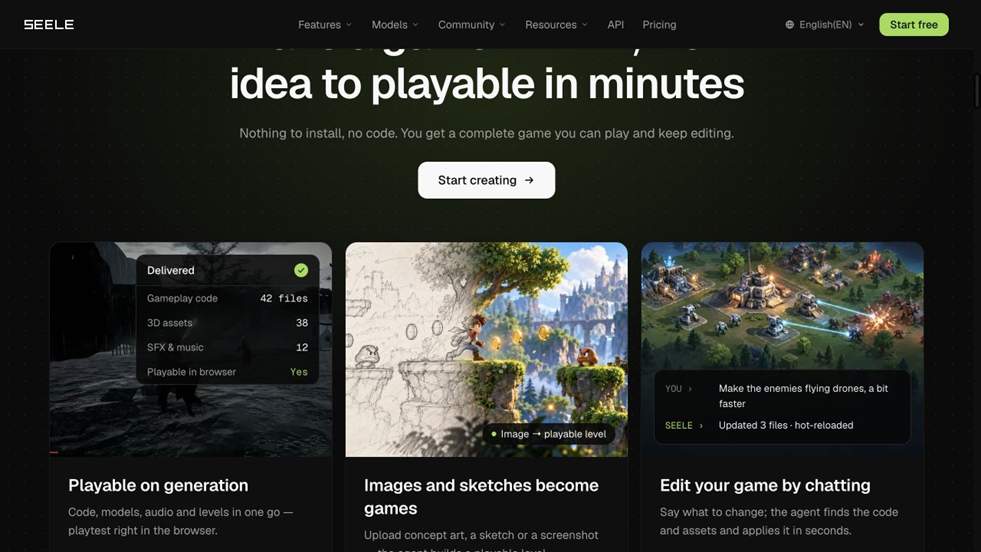
SEELE AI takes this prompt-to-play approach. Its agent can assemble code, 3D assets, audio and levels, then make changes through a conversational interface. The resulting build can be played in a browser, which makes it easier to share with a client or internal team. The SEELE AI platform gives product teams a concrete artifact to review early.
Why prototypes are more useful than polished mockups
A static mockup can show visual hierarchy, but it cannot fully answer whether a user understands the objective, whether the feedback arrives at the right time or whether the sequence feels satisfying. A playable prototype exposes those questions immediately.
For a web or app team, this is especially valuable when the feature involves state, choice or movement. A small game-like interaction may look simple in a design file but require many decisions in implementation. Building a narrow slice early allows the team to identify the important decisions and remove unnecessary complexity.
The best prototype has a clear test. For example:
- Can a new user complete the main action without instruction?
- Does the visual metaphor explain the workflow?
- Can a client describe the desired change after playing once?
- Does the interaction justify a custom build?
A five-step process for product teams
- Write the behavior before the technology
Describe who uses the feature, what they are trying to accomplish and what should happen after success. Avoid starting with a list of frameworks. A behavior-led brief gives the prototype a measurable purpose.
- Generate the smallest meaningful version
Ask for one scene, one user goal and one feedback loop. If the idea is a game, keep the first build to a single mechanic. If it is a product demonstration, focus on the moment that communicates the benefit.
- Share the build with people outside the project
A browser link is useful because reviewers do not need the same local setup. Ask them to describe what they thought the goal was, what they tried first and where they hesitated.
- Iterate with specific requests
A request such as “make it better” produces weak feedback. Point to the system that needs changing: simplify the tutorial, make the target more visible, shorten the first round or change the scene lighting.
- Decide what deserves production effort
Some prototypes reveal a strong idea. Others show that the interaction is confusing or unnecessary. Both outcomes save time because the decision is based on use rather than assumption.
Where website developers fit in
AI generation is useful for exploration, but product quality still depends on engineering discipline. A production team must review security, data flows, performance, accessibility, analytics and maintenance. The prototype should be treated as evidence for the next implementation, not as an excuse to skip those checks.
For teams that want to continue into a more traditional pipeline, SEELE describes support for Unity, Unreal, Godot and Three.js workflows in addition to browser publishing. That makes it possible to use the same early concept across a web experiment, a client demo and a larger game project.
A practical example
Imagine a learning company wants to teach a safety procedure through a short interactive scenario. The first brief might ask for a warehouse scene, three decisions and immediate feedback after each choice. An AI game maker can produce a rough version quickly. The product team can then ask a trainer to play it and explain which decision felt unclear.
The next iteration may remove decorative elements, make the consequences more visible and change the order of the choices. Those revisions are easier to discuss when everyone has played the same thing. Once the learning loop works, the team can decide whether to rebuild the feature in its main web stack or expand the prototype into a richer experience.
The value is faster learning
The business case for AI game prototyping is simple: it reduces the cost of being wrong early. Teams can test more ideas, involve clients sooner and make technical decisions with better information. That is useful for agencies, SaaS companies, education providers and brands that want interactive content but cannot justify a full production pipeline for every concept.
An AI game maker does not replace product strategy or development expertise. It gives those teams a faster way to see the behavior they are discussing. When the first working version arrives sooner, the quality of the conversation improves.
Use the prototype to improve estimates
A small playable build can also make project estimation more realistic. Teams can see which screens, interactions and assets are genuinely necessary, then separate those from optional polish. That gives clients a clearer range for a minimum viable release and a later enhancement phase. It also helps developers identify integration work before a contract is locked.
The result is a healthier discovery conversation. Instead of estimating from a feature list alone, the team can discuss a demonstrated flow, the evidence gathered from playtesting and the tradeoffs that remain.
Turn feedback into a better specification
The most useful outcome of a prototype is often the language it gives the team. After a client plays the build, the conversation moves from broad requests to observable behavior: the visitor missed the call to action, the learner needed another hint, or the game mechanic became repetitive after the second round. Those observations can be written into acceptance criteria for the production version.
This also makes collaboration easier across disciplines. Designers can point to the moment that needs a new visual treatment, developers can identify the state transition that requires a robust implementation, and account managers can explain why a particular change affects scope. The prototype becomes a shared reference point that reduces ambiguity during the next phase.
For a website or application agency, that clarity can be as valuable as the speed of generation. A short experiment helps the team protect the client’s budget, prioritize the interaction that matters and avoid polishing a direction that users do not understand. Try SEELE NOW.
Leave a Reply